


Google Ads & Meta Ads Protection Protect Every Visit and Form. Grow Your Budget
ClickSambo blocks fake clicks and form submissions on Google Ads, Facebook and Instagram — and teaches each algorithm who your real customers are.
How it works for GGoogle Ads ↓Meta Ads ↓
Bot blocking + Conversion optimization + Algorithm training • Single platform, full protection • 24/7 active
ClickSambo at a glance
- What is ClickSambo?
- ClickSambo is a click fraud protection platform for Google Ads and Meta Ads. It keeps fake clicks and form submissions away from your ad budget.
- How does it protect Google Ads?
- ClickSambo sends malicious IPs to Google Ads as exclusions the moment they cross click thresholds. It also reports them as negative conversions, so Google's AI stops targeting similar profiles.
- How does it protect Meta Ads?
- ClickSambo adds malicious visitors to a negative excluded audience in Meta Ads, so your ads stop reaching them. It also scores Instant Form leads before they reach your team.
- How long does setup take?
- 5 minutes at most per network. On Google Ads you add the tracking code and connect your account; on Meta you sign in and choose your ad account and pixel.
- Is there a free trial?
- Yes. Every plan starts with a 7-day free trial. Meta Ads Protection is included in every plan.
Invalid clicks in numbers
Source: ClickSambo, Turkey Invalid Click Report, Q2 2026. Google Ads clicks recorded by ClickSambo between April and June 2026. Figures describe ClickSambo-tracked traffic, not the whole market.
What do fake clicks do to your budget and algorithm?
Direct Financial Loss
Direct Financial Loss / 2 in 5 paid clicks don't come from a real user
Incorrect Algorithm Learning
Algorithm Poisoning / Smart Bidding mistakes fake clicks for success
Incorrect Data Sources, Misleading Decisions
Dirty Data, Wrong Decisions / Analytics data polluted by fake traffic
How does ClickSambo protect Google Ads in 4 steps?
ClickSambo watches your traffic, filters fake clicks, sends signals to Google and grows your budget.
How does ClickSambo train Google's algorithm?
ClickSambo sends negative and positive signals to Google Ads through Offline Conversion Tracking, so Smart Bidding learns from clean data.
Setup guide: Conversion Tracking (Beta)
Negative Signal → To Google
Positive Signal → To Google
Which signals are sent to Google?
ClickSambo analyses traffic, classifies signals and sends them to Google, where Smart Bidding learns.
Traffic Analysis
ClickSambo analyzes all clicks based on device, IP, behavior, and source.
Signal Classification
Low-quality traffic is marked as negative, real interactions are marked as positive.
Send to Google
These signals are sent to Google Ads via Offline Conversion Tracking.
Algorithm Learns
Smart Bidding targets higher-quality customers using clean data.
How does ClickSambo detect fake clicks?
ClickSambo combines device fingerprinting, VPN / proxy / Tor detection, real-time blocking and behavioral AI.
Advanced Device Fingerprinting
Recurring fraudulent traffic sources are detected using device fingerprinting.
VPN / Proxy / Tor
Anonymous traffic layers are identified to prevent budget loss.
Real-Time Blocking
Suspicious traffic is blocked within milliseconds.
Behavioral AI
Real users and fake traffic are separated through behavioral analysis.
We Don't Just Protect Your Budget — We Grow It
ClickSambo grows your results by saving budget, raising the real click rate and lowering CPC.
Budget Savings & Growth
Fake clicks are blocked and the remaining budget is directed to real customers.
Algorithm Training
Google Smart Bidding learns to find higher-quality customers through offline conversions.
Google Refund Management
We manage the refund process from Google for invalid clicks on your behalf.
Custom Conversion Rules
Industry-specific conversion rules and risk sensitivity for enterprise clients.
What do you see in the ClickSambo dashboard?
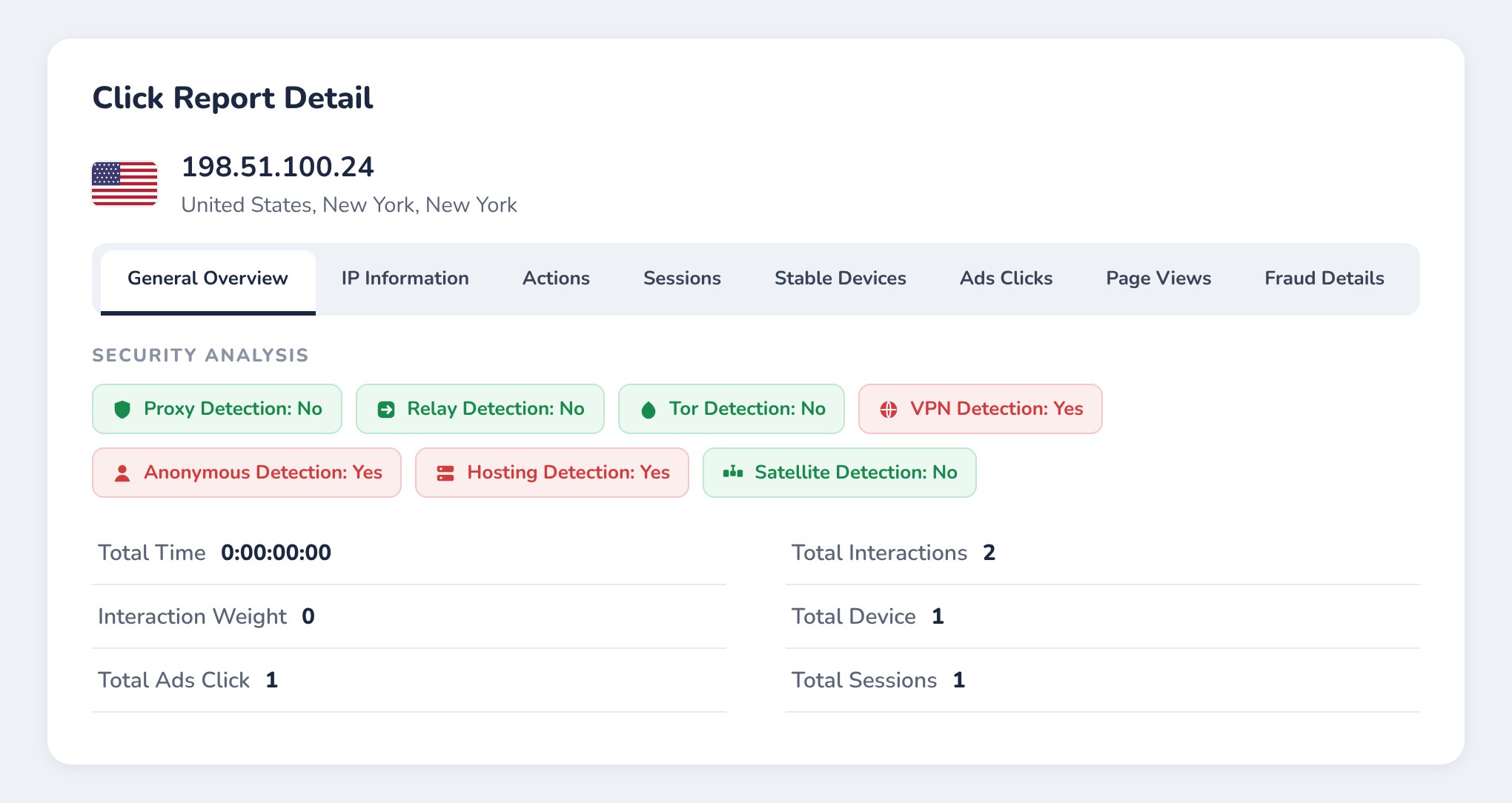
Fraud Analysis Panel — IP, priority, date, and geographic location in one panel.
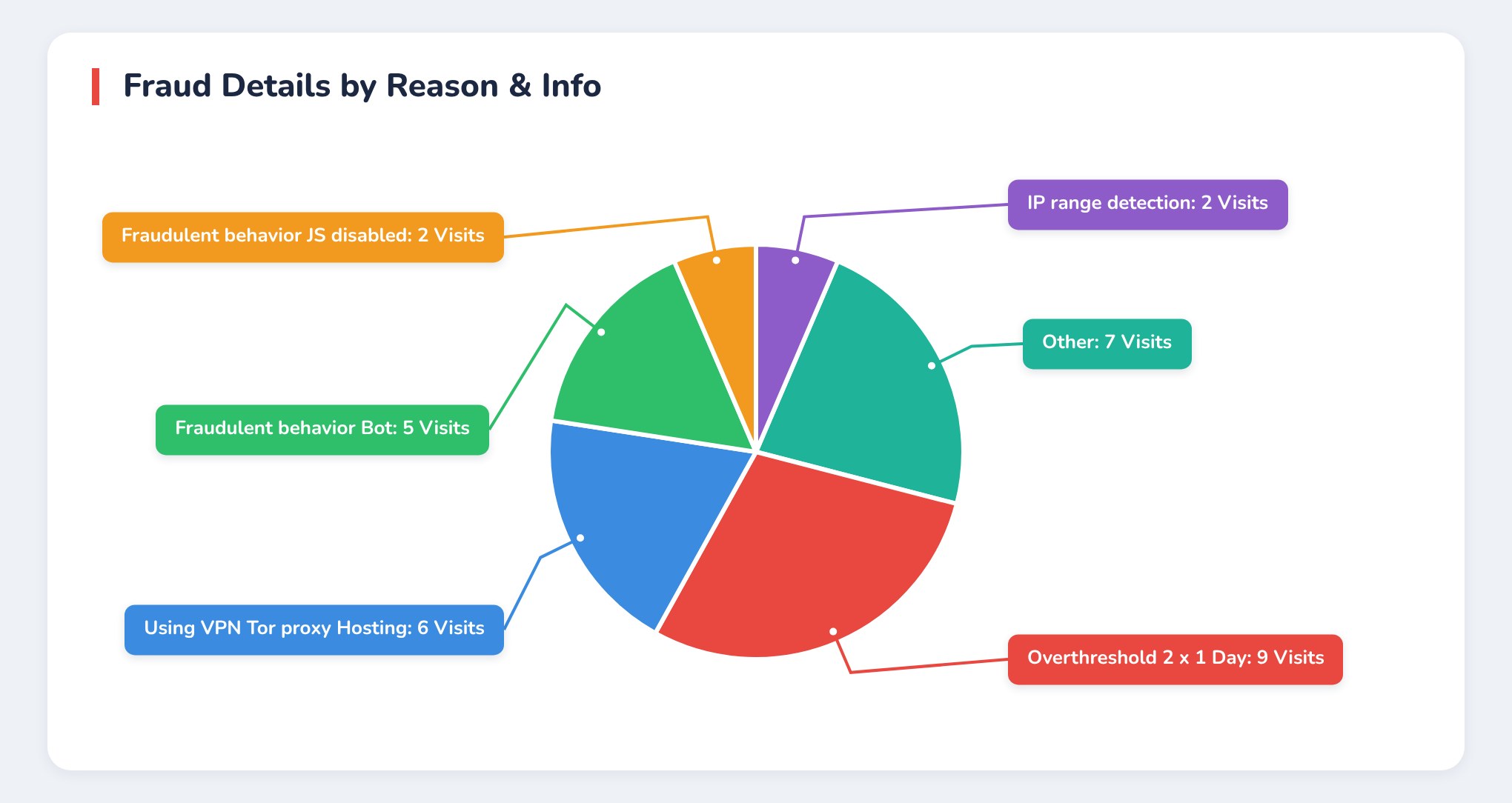
Fraud Type Distribution — VPN, click farm, JS disabled, ad injection.
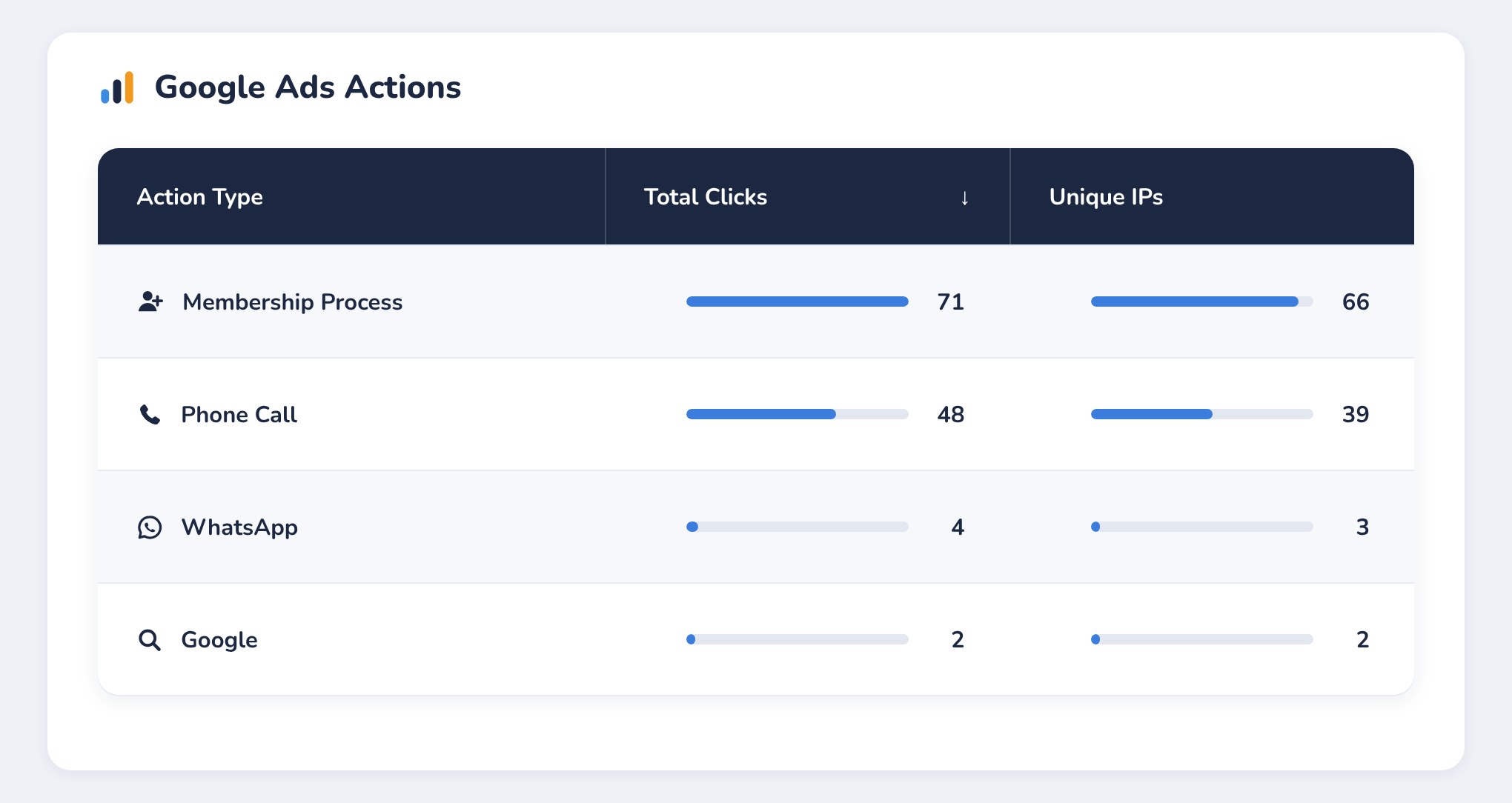
Channel & Conversion Analysis — Performance based on device, behavior, and source.
How do you set up ClickSambo for Google Ads?
ClickSambo is set up in about 5 minutes: sign up, add two lines of code and connect Google Ads.
Create your account
Log in with the Google account that manages your Google Ads account.
- Manage tracking settings
- Manage IP exclusion lists
What happens after setup?
ClickSambo analyses your account, you test it for 7 days with live data, and we review the results together before full protection continues.
Anomaly Detection
Traffic and budget losses in your account are analyzed.
7-Day Free Trial
Experience the system risk-free with your live data.
Analysis Meeting
We review the trial results with you and confirm the plan that fits your needs.
Full Protection & Ad Performance Improvement
Your budget stays protected, the algorithm keeps learning and performance increases.
Frequently Asked Questions
Does ClickSambo only block bots? / Algorithm training
+
ClickSambo doesn’t just block bots; it also helps train the Google Ads algorithm to find higher-quality customers.
Doesn't Google already filter invalid clicks?
+
Yes, Google filters part of invalid traffic. ClickSambo works differently: it detects malicious traffic by your click thresholds and by how fast it arrives, adds IP intelligence such as VPN and proxy data, links it to on-site behaviour, and feeds Google Ads dynamically so your ads are optimised.
What do negative and positive conversion signals mean?
+
Negative signals represent low-quality interactions such as bots, VPNs, and fake clicks; positive signals represent real user behaviors such as forms, scrolling, and time on page.
What are Custom Conversion Rules?
+
These are filtering and optimization rules tailored to industry and conversion logic for enterprise clients.
How long does it take for the algorithm to learn?
+
It depends on the data volume of your account; results are usually seen within a few weeks.
Stop Protecting Your Budget, Start Growing It.
Grow your advertising budget with data-driven management, fraud protection, and algorithm training.
How does ClickSambo protect Meta Ads?
ClickSambo tracks every Meta ad click, excludes fraudulent visitors with Meta's own audience tools and scores Instant Form leads before they reach your team.
How does the process run from connection to exclusion?
Connect
Sign in with Meta and pick your ad account and pixel; tracking parameters are added for you.
Track
Every Facebook and Instagram visit is recorded with its click ID, device and network details.
Detect
Click limits, VPN / proxy / Tor checks and behaviour analysis flag suspicious visitors.
Exclude
Flagged visitors are added to a custom audience that all your ad sets exclude.
How are fake visitors excluded on Meta?
ClickSambo catches malicious traffic by click fraud thresholds and creates a negative excluded audience list in Meta Ads. Since Meta does not allow IP blocking, this is how your ads stop reaching the related profiles.
Official documentation: Meta for Developers — Conversions API
Fraudulent click
Conversions API event
FraudulentVisitCustom audience
ClickSambo Fraudulent VisitorsExcluded on every ad set
excluded_custom_audiencesWhere can you see every Meta click?
ClickSambo shows clicks, fraud and protected visitors per placement, in the same view you use for Google Ads.
How are fake leads filtered on Meta?
ClickSambo scores each Instant Form lead the moment Meta delivers it. Fake submissions are flagged and excluded, so no sales call is wasted.
Content validation
Name, e-mail and phone checks, including 8,700+ disposable e-mail domains.
Pattern and volume
Repeated identities and bot-like submission rhythms.
Global identity network
Identities already seen on other advertisers' forms.
Ad context
Phone country versus targeting, and the ad's own click quality.
Blocked at the source
Fraudulent e-mails and phones are hashed and added to a customer-list audience that every ad set excludes, so the same person (in reality a bot or a malicious user) is not shown your lead ad again.
Your verdict counts
Mark any lead Real or Fake in the dashboard. ClickSambo updates the exclusion audience, the identity network and Meta within seconds, so your own observations feed straight back into your marketing data.
Your verdict: Mark any lead Real or Fake in the dashboard.
How is lead feedback sent to Meta?
ClickSambo reports every lead's stage back to Meta, so delivery shifts toward people who actually become customers.
How does ClickSambo manage Google Ads and Meta Ads in one panel?
Same domain settings
Blocking rules and click limits apply to both networks.
Shared alerts and reports
One set of alerts and daily / weekly summaries.
Mobile app
Check both networks from the ClickSambo app.
Three languages
English, Turkish and Portuguese everywhere.
How do you set up Meta Ads Protection?
ClickSambo connects to Meta from the Connections menu of your dashboard.
One Meta ad account is connected per protected website.
One Meta ad account is connected per protected website. Meta clicks count toward the traffic limit.
Protect your Meta budget today
Setup takes minutes. The first exclusions land the same day.
Fake clicks not only drain your budget but also mislead your algorithm.
- Quick Installation
- 24/7 Support

